一、axios介绍 json-server介绍 github: https://github.com/typicode/json-server
1 npm install -g json-server
用来快速搭建 REST API 的工具包
axios github: https://github.com/axios/axios
运行在浏览器和node.js,用于发送Ajax请求
1 2 3 4 axios.get('http://localhost:3000/posts?title=json-server&author=typicode' ); axios.post('http://localhost:3000/posts' , {title : 'xxx' , author : 'yyyy' }) axios.put('http://localhost:3000/comments/2' , {body : 'yyy' , postI d: 2 }) axios.delete('http://localhost:3000/comments/2' )
基本 promise 的异步 ajax 请求库
浏览器端/node 端都可以使用
支持请求/响应拦截器
支持请求取消
请求/响应数据转换
批量发送多个请求
axios配置对象 1 2 3 4 5 6 7 8 9 10 11 12 13 14 15 16 17 18 19 20 21 22 23 24 25 26 27 28 29 30 31 32 33 34 35 36 37 38 39 40 41 42 43 44 45 46 47 48 49 50 51 52 53 54 55 56 57 58 59 60 61 62 63 64 65 66 67 68 69 70 71 72 73 74 75 76 77 78 79 80 81 82 83 84 85 86 87 88 89 90 91 92 93 94 95 96 97 98 99 100 101 102 103 104 105 106 107 108 109 110 { url: '/user', method: 'get', baseURL: 'https: transformRequest: [function (data, headers) { return data; }], transformResponse: [function (data) { return data; }], headers: {'X-Requested-With': 'XMLHttpRequest'}, params: { ID: 12345 }, paramsSerializer: function (params) { return Qs.stringify(params, {arrayFormat: 'brackets'}) }, data: { firstName: 'Fred' }, data: 'Country=Brasil&City=Belo Horizonte', timeout: 1000 , withCredentials: false , adapter: function (config) { }, auth: { username: 'janedoe', password: 's00pers3cret' }, responseType: 'json', responseEncoding: 'utf8', xsrfCookieName: 'XSRF-TOKEN', xsrfHeaderName: 'X-XSRF-TOKEN', onUploadProgress: function (progressEvent) { }, onDownloadProgress: function (progressEvent) { }, maxContentLength: 2000 , maxBodyLength: 2000 , validateStatus: function (status) { return status >= 200 && status < 300; }, maxRedirects: 5 , socketPath: null , httpAgent: new http.Agent({ keepAlive: true }), httpsAgent: new https.Agent({ keepAlive: true }), proxy: { protocol: 'https', host: '127.0 .0 .1 ', port: 9000 , auth: { username: 'mikeymike', password: 'rapunz3l' } }, cancelToken: new CancelToken(function (cancel) { }), decompress: true } }
axios创建实例对象
根据指定配置创建一个新的 axios , 也就就每个新 axios 都有自己的配置
新 axios 只是没有取消请求和批量发请求的方法, 其它所有语法都是一致的
为什么要设计这个语法?
(1) 需求: 项目中有部分接口需要的配置与另一部分接口需要的配置 不太一 样, 如何处理
(2) 解决: 创建 2 个新 axios, 每个都有自己特有的配置, 分别应用到不同要 求的接口请求中
1
2
3
4
5
6
7
8
9
const request = axios.create({ baseURL : "http://api.apiopen.top" , timeout : 2000 }) request({ url :'/getJoke' , }).then(response => console .log(request) })
axios拦截器
说明: 调用 axios()并不是立即发送 ajax 请求 , 而是需要经历一个较长的流程
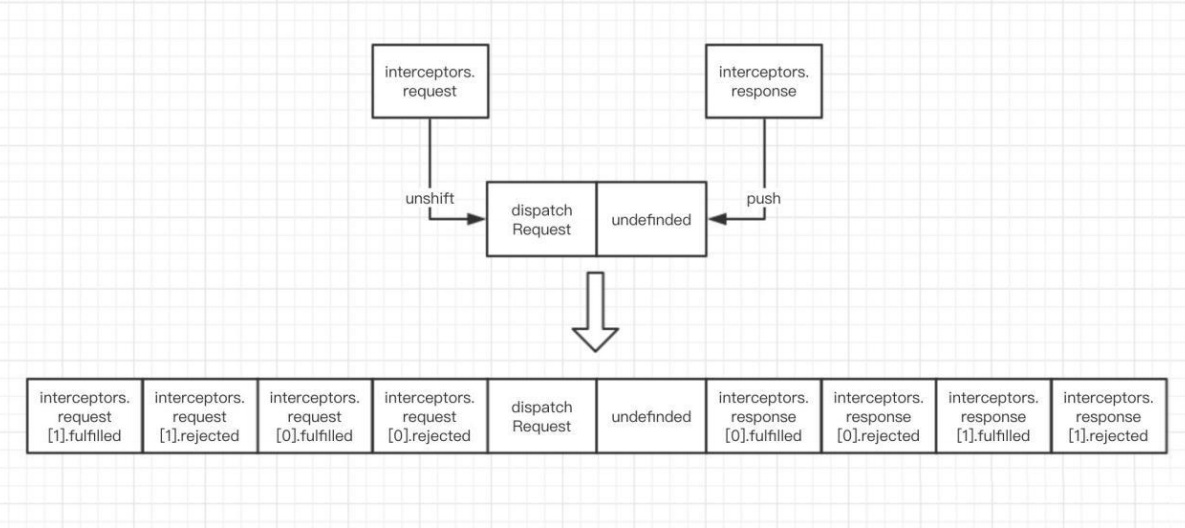
流程: 请求拦截器2 => 请求拦截器 1 => 发ajax请求 => 响应拦截器1 => 响应拦截器 2 => 请求的回调
注意: 此流程是通过 promise 串连 起来的, 请求拦截器传递的是config , 响应 拦截器传递的是 response
1 2 3 4 5 6 7 8 9 10 11 12 13 14 15 16 17 axios.interceptors.request.use(function (config ) return config; }, function (error ) return Promise .reject(error); }); axios.interceptors.response.use(function (response ) return response; }, function (error ) return Promise .reject(error); });
取消请求
基本流程
配置 cancelToken 对象
实现功能
点击按钮, 取消某个正在请求中的请求
1
2
3
4
5
6
7
8
9
10
11
12
13
14
15
16
17
18
19
20
21
22
23
24
25
26
27
28
29
30
31
32
33
34
35
36
37
38
39
40
41
42
43
44
45
46
47
48
49
50
51
52
53
54
55
56
57
58
59
60
61
62
63
64
65
66
67
68
69
70
let cancel function getProducts1 ( if (typeof cancel==='function' ) { cancel('取消请求' ) } axios({ url : 'http://localhost:4000/products1' , cancelToken : new axios.CancelToken((c ) => { cancel = c }) }).then( response => cancel = null console .log('请求1成功了' , response.data) }, error => if (axios.isCancel(error)) { console .log('请求1取消的错误' , error.message) } else { cancel = null console .log('请求1失败了' , error.message) } } ) } function getProducts2 ( if (typeof cancel==='function' ) { cancel('取消请求' ) } axios({ url : 'http://localhost:4000/products2' , cancelToken : new axios.CancelToken((c ) => { cancel = c }) }).then( response => cancel = null console .log('请求2成功了' , response.data) }, error => if (axios.isCancel(error)) { console .log('请求2取消的错误' , error.message) } else { cancel = null console .log('请求2失败了' , error.message) } } ) } function cancelReq ( if (typeof cancel === 'function' ) { cancel('强制取消请求' ) } else { console .log('没有可取消的请求' ) } }
二、axios源码 文件目录 1 2 3 4 5 6 7 8 9 10 11 12 13 14 15 16 17 18 ├── /dist/ # 项目输出目录 ├── /lib/ # 项目源码目录 │ ├── /adapters/ # 定义请求的适配器 xhr、http │ │ ├── http.js # 实现 http 适配器(包装 http 包) │ │ └── xhr.js # 实现 xhr 适配器(包装 xhr 对象) │ ├── /cancel/ # 定义取消功能 │ ├── /core/ # 一些核心功能 │ │ ├── Axios.js # axios 的核心主类 │ │ ├── dispatchRequest.js # 用来调用 http 请求适配器方法发送请求的函数 │ │ ├── InterceptorManager.js # 拦截器的管理器 │ │ └── settle.js # 根据 http 响应状态,改变 Promise 的状态 │ ├── /helpers/ # 一些辅助方法 │ ├── axios.js # 对外暴露接口 │ ├── defaults.js # axios 的默认配置 │ └── utils.js # 公用工具 ├── package.json # 项目信息 ├── index.d.ts # 配置 TypeScript 的声明文件 └── index.js
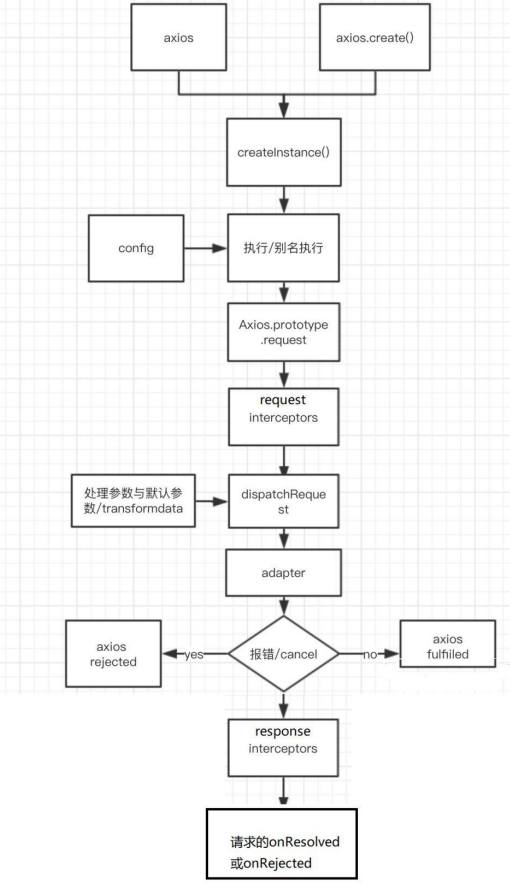
create流程 axios的创建流程 通过createInstance()函数将传入默认配置创建一个axios对象。
1 2 3 4 5 6 7 8 9 10 11 12 13 14 15 16 17 18 19 20 21 22 23 24 25 26 27 28 29 30 31 32 33 34 35 36 37 38 39 40 41 42 43 44 45 46 47 48 49 50 51 52 53 54 55 56 57 58 59 60 61 62 63 64 65 'use strict' ;var utils = require ('./utils' );var bind = require ('./helpers/bind' );var Axios = require ('./core/Axios' );var mergeConfig = require ('./core/mergeConfig' );var defaults = require ('./defaults' );function createInstance (defaultConfig ) var context = new Axios(defaultConfig); var instance = bind(Axios.prototype.request, context); utils.extend(instance, Axios.prototype, context); utils.extend(instance, context); return instance; } var axios = createInstance(defaults);axios.Axios = Axios; axios.create = function create (instanceConfig ) return createInstance(mergeConfig(axios.defaults, instanceConfig)); }; axios.Cancel = require ('./cancel/Cancel' ); axios.CancelToken = require ('./cancel/CancelToken' ); axios.isCancel = require ('./cancel/isCancel' ); axios.all = function all (promises ) return Promise .all(promises); }; axios.spread = require ('./helpers/spread' ); module .exports = axios;module .exports.default = axios;
Axios.js
1 2 3 4 5 6 7 8 9 10 11 12 13 14 15 16 17 18 19 20 21 22 23 24 25 26 27 28 29 30 31 32 33 34 35 36 37 38 39 40 41 42 43 44 45 46 47 48 49 50 51 52 53 54 55 56 57 58 59 60 61 62 63 64 65 66 67 68 69 70 71 72 73 74 75 76 77 78 79 80 81 82 83 84 85 86 87 88 89 90 91 92 93 94 95 96 97 98 99 100 101 102 103 'use strict' ;var utils = require ('./../utils' );var buildURL = require ('../helpers/buildURL' );var InterceptorManager = require ('./InterceptorManager' );var dispatchRequest = require ('./dispatchRequest' );var mergeConfig = require ('./mergeConfig' );function Axios (instanceConfig ) this .defaults = instanceConfig; this .interceptors = { request : new InterceptorManager(), response : new InterceptorManager() }; } Axios.prototype.request = function request (config ) if (typeof config === 'string' ) { config = arguments [1 ] || {}; config.url = arguments [0 ]; } else { config = config || {}; } config = mergeConfig(this .defaults, config); config.method = config.method ? config.method.toLowerCase() : 'get' ; var chain = [dispatchRequest, undefined ]; var promise = Promise .resolve(config); this .interceptors.request.forEach(function unshiftRequestInterceptors (interceptor ) chain.unshift(interceptor.fulfilled, interceptor.rejected); }); this .interceptors.response.forEach(function pushResponseInterceptors (interceptor ) chain.push(interceptor.fulfilled, interceptor.rejected); }); while (chain.length) { promise = promise.then(chain.shift(), chain.shift()); } return promise; }; Axios.prototype.getUri = function getUri (config ) config = mergeConfig(this .defaults, config); return buildURL(config.url, config.params, config.paramsSerializer).replace(/^\?/ , '' ); }; utils.forEach(['delete' , 'get' , 'head' , 'options' ], function forEachMethodNoData (method ) Axios.prototype[method] = function (url, config ) return this .request(utils.merge(config || {}, { method : method, url : url })); }; }); utils.forEach(['post' , 'put' , 'patch' ], function forEachMethodWithData (method ) Axios.prototype[method] = function (url, data, config ) return this .request(utils.merge(config || {}, { method : method, url : url, data : data })); }; }); module .exports = Axios;
模拟实现axios 1 2 3 4 5 6 7 8 9 10 11 12 13 14 15 16 17 18 19 20 21 22 23 24 25 26 27 28 29 30 31 32 33 34 35 36 37 38 39 40 41 42 43 function Axios (config ) this .default = config; this .intercepters = { request :{}, response :{} } } Axios.prototype.request = function (config ) console .log('发送ajax请求' ) } Axios.prototype.get = function (config ) this .request({method :'get' }); } Axios.prototype.post = function (config ) this .request({method :'post' }); } function createInstance (config ) let context = new Axios(conif); let instance = Axios.protoype.request.bind(context); Object .key(Axios.prototype).forEach(key => console .log(key); instance[key] = Axios.prototype[key].bind(context); }) Object .key(context).forEach(key => instance[key] = context[key] }) } let axios = createInstance();axios.get({});
Axios发送请求过程详解 源码 1 2 3 4 5 6 7 8 9 10 11 12 13 14 15 16 17 18 19 20 21 22 23 24 25 26 27 28 29 30 31 32 33 34 35 36 37 38 39 40 41 42 43 44 45 46 Axios.prototype.request = function request (config ) if (typeof config === 'string' ) { config = arguments [1 ] || {}; config.url = arguments [0 ]; } else { config = config || {}; } config = mergeConfig(this .defaults, config); config.method = config.method ? config.method.toLowerCase() : 'get' ; var chain = [dispatchRequest, undefined ]; var promise = Promise .resolve(config); this .interceptors.request.forEach(function unshiftRequestInterceptors (interceptor ) chain.unshift(interceptor.fulfilled, interceptor.rejected); }); this .interceptors.response.forEach(function pushResponseInterceptors (interceptor ) chain.push(interceptor.fulfilled, interceptor.rejected); }); while (chain.length) { promise = promise.then(chain.shift(), chain.shift()); } return promise; };
dispatchRequest.js
1 2 3 4 5 6 7 8 9 10 11 12 13 14 15 16 17 18 19 20 21 22 23 24 25 26 27 28 29 30 31 32 33 34 35 36 37 38 39 40 41 42 43 44 45 46 47 48 49 50 51 52 53 54 55 56 57 58 59 60 61 62 63 64 65 66 67 68 69 70 71 72 73 74 75 76 77 78 79 80 81 82 83 84 85 86 87 88 function throwIfCancellationRequested (config ) if (config.cancelToken) { config.cancelToken.throwIfRequested(); } } module .exports = function dispatchRequest (config ) throwIfCancellationRequested(config); if (config.baseURL && !isAbsoluteURL(config.url)) { config.url = combineURLs(config.baseURL, config.url); } config.headers = config.headers || {}; config.data = transformData( config.data, config.headers, config.transformRequest ); config.headers = utils.merge( config.headers.common || {}, config.headers[config.method] || {}, config.headers || {} ); utils.forEach( ['delete' , 'get' , 'head' , 'post' , 'put' , 'patch' , 'common' ], function cleanHeaderConfig (method ) delete config.headers[method]; } ); var adapter = config.adapter || defaults.adapter; return adapter(config).then(function onAdapterResolution (response ) throwIfCancellationRequested(config); response.data = transformData( response.data, response.headers, config.transformResponse ); return response; }, function onAdapterRejection (reason ) if (!isCancel(reason)) { throwIfCancellationRequested(config); if (reason && reason.response) { reason.response.data = transformData( reason.response.data, reason.response.headers, config.transformResponse ); } } return Promise .reject(reason); }); };
模拟实现axios发送请求 1 2 3 4 5 6 7 8 9 10 11 12 13 14 15 16 17 18 19 20 21 22 23 24 25 26 27 28 29 30 31 32 33 34 35 36 37 38 39 40 41 42 43 44 45 46 47 48 49 50 51 52 53 54 55 56 57 58 59 60 61 62 63 64 65 66 67 68 69 70 71 72 73 74 75 function Axios (config ) this .config = config; } Axios.prototype.request = function (config ) let promise = Promise .resolve(config); let chains = [dispatchRequest, undefined ]; let result = promise.then(chains[0 ], chains[1 ]); return result; } function dispatchRequest (config ) return xhrAdapter(config).then(response => console .log(response); return response; }, error => console .log(error); throw error; }) } function xhrAdapter (config ) console .log('xhrAdapter 函数执行' ); return new Promise ((resolve, reject ) => { let xhr = new XMLHttpRequest() xhr.open(config.method, config.url); xhr.send(); xhr.onreadystatechange = function ( if (xhr.readyState === 4 ){ if (xhr.status >= 200 && x.status < 300 ){ resolve({ config :config, data : xhr.response, headers : xhr.getAllResponseHeaders(), request : xhr, status : xhr.status, statusText : xhr.statusText }); }else { reject(new Error ('请求失败,失败的状态码为' +xhr.status)); } } } }) } let axios = Axios.prototype.request.bind(null );axios({ method :'GET' , url :'http:localhost:3000/post' }).then(response => console .log(response); })
拦截器 源码实现 use方法只是把回调保存在了request和response对象上的handlers上,当创建Axios对象时,把请求拦截器放在数组最前面,响应拦截器放在数组最后面,最终通过循环的方式以跳板的形式(一组一组的放,响应执行响应,请求执行请求)。
requset中
1 2 3 4 5 6 7 8 9 10 11 12 this .interceptors.request.forEach(function unshiftRequestInterceptors (interceptor ) chain.unshift(interceptor.fulfilled, interceptor.rejected); }); this .interceptors.response.forEach(function pushResponseInterceptors (interceptor ) chain.push(interceptor.fulfilled, interceptor.rejected); }); while (chain.length) { promise = promise.then(chain.shift(), chain.shift()); }
InterceptorManager.js
1 2 3 4 5 6 7 8 9 10 11 12 13 14 15 16 17 18 19 20 21 22 23 24 25 26 27 28 29 30 31 32 33 34 35 36 37 38 39 40 41 42 43 44 45 46 47 48 49 50 51 52 53 function InterceptorManager ( this .handlers = []; } InterceptorManager.prototype.use = function use (fulfilled, rejected ) this .handlers.push({ fulfilled : fulfilled, rejected : rejected }); return this .handlers.length - 1 ; }; InterceptorManager.prototype.eject = function eject (id ) if (this .handlers[id]) { this .handlers[id] = null ; } }; InterceptorManager.prototype.forEach = function forEach (fn ) utils.forEach(this .handlers, function forEachHandler (h ) if (h !== null ) { fn(h); } }); }; module .exports = InterceptorManager;
模拟实现拦截器 1 2 3 4 5 6 7 8 9 10 11 12 13 14 15 16 17 18 19 20 21 22 23 24 25 26 27 28 29 30 31 32 33 34 35 36 37 38 39 40 41 42 43 44 45 46 47 48 49 50 51 52 53 54 55 56 57 58 59 60 61 62 63 64 65 66 67 68 69 70 71 72 73 74 75 76 77 78 79 80 81 82 83 84 85 86 87 88 89 90 91 92 93 94 95 96 97 function Axios (config ) this .config = config; this .interceptors = { request : new InterceptorManager(), response : new InterceptorManager(), } } function InterceptorManager ( this .handlers = []; } InterceptorManager.prototype.use = function (fulfilled, rejected ) this .handlers.push({ fulfilled, rejected }) } Axios.prototype.request = function (config ) let promise = Promise .resolve(config); let chains = [dispatchRequest, undefined ]; this .interceptors.request.handlers.forEach(item => chains.unshift(item.fulfilled, item.rejected); }) this .interceptors.response.handlers.forEach(item => chains.push(item.fulfilled, item.rejected); }) console .log(chains); while (chains.length) { promise = promise.then(chains.shift(), chains.shift()); } return promise; let result = promise.then(chains[0 ], chains[1 ]); return result; } function dispatchRequest (config ) return new Promise ((resolve, reject ) => { console .log("发送请求" ); resolve({ status : 200 , statusText : 'OK' }) }) } let context = new Axios({});let axios = Axios.prototype.request.bind(context);Object .keys(context).forEach(key => axios[key] = context[key]; }) axios.interceptors.request.use(function (config ) console .log("请求拦截器" ); return config; }, function (config ) return cofnig; }) axios.interceptors.response.use(function (success ) console .log("响应拦截器" ); return success; }, function (error ) return error; }) axios({ method : 'GET' , url : 'http:localhost:3000/post' }).then(response => console .log(response); })
axios取消请求工作原理 源码 创建对象时有一个config:cancelToken这个函数的状态只要已发送改变,就会取消请求,axios将取消函数暴露出来,二在xhr中会判断是否有这个属性,如果这个promise状态改变之后,就会停止ajax的发送。
1 2 3 4 let cancel = c;let cancelToken = new axios.CancelToken(function ( cancel = c; })
CancelToken.js
1 2 3 4 5 6 7 8 9 10 11 12 13 14 15 16 17 18 19 20 21 22 23 24 25 26 27 28 29 30 31 32 33 34 35 36 37 38 39 40 41 42 43 44 45 46 47 48 49 50 51 52 53 54 55 56 57 58 59 60 61 62 63 64 65 66 67 68 69 'use strict' ;var Cancel = require ('./Cancel' );function CancelToken (executor ) if (typeof executor !== 'function' ) { throw new TypeError ('executor must be a function.' ); } var resolvePromise; this .promise = new Promise (function promiseExecutor (resolve ) resolvePromise = resolve; }); var token = this ; executor(function cancel (message ) if (token.reason) { return ; } token.reason = new Cancel(message); resolvePromise(token.reason); }); } CancelToken.prototype.throwIfRequested = function throwIfRequested ( if (this .reason) { throw this .reason; } }; CancelToken.source = function source ( var cancel; var token = new CancelToken(function executor (c ) cancel = c; }); return { token : token, cancel : cancel }; }; module .exports = CancelToken;
在xhr.js中有这样一段代码 xhr.about
1 2 3 4 5 6 7 8 9 10 11 12 13 14 15 if (config.cancelToken) { config.cancelToken.promise.then(function onCanceled (cancel ) if (!request) { return ; } request.abort(); reject(cancel); request = null ; }); }
模拟实现取消请求 1 2 3 4 5 6 7 8 9 10 11 12 13 14 15 16 17 18 19 20 21 22 23 24 25 26 27 28 29 30 31 32 33 34 35 36 37 38 39 40 41 42 43 44 45 46 47 48 49 50 51 52 53 54 55 56 57 58 59 60 61 62 63 64 65 66 67 68 69 70 71 72 73 74 75 76 77 78 79 80 81 82 83 84 85 86 87 88 89 90 91 92 93 94 95 96 function Axios (config ) this .config = config; } Axios.prototype.request = function (config ) let promise = Promise .resolve(config); let chains = [dispatchRequest, undefined ]; let result = promise.then(chains[0 ], chains[1 ]); return dispatchRequest(config); } function dispatchRequest (config ) return xhrAdapter(config); } function xhrAdapter (config ) console .log('xhrAdapter 函数执行' ); return new Promise ((resolve, reject ) => { let xhr = new XMLHttpRequest() xhr.open(config.method, config.url); xhr.send(); xhr.onreadystatechange = function ( if (xhr.readyState === 4 ){ if (xhr.status >= 200 && x.status < 300 ){ resolve({ config :config, data : xhr.response, headers : xhr.getAllResponseHeaders(), request : xhr, status : xhr.status, statusText : xhr.statusText }); }else { reject(new Error ('请求失败,失败的状态码为' +xhr.status)); } } } if (config.cancelToken){ config.cancelToken.promise.then(value => xhr.abort(); }) } }) } const context = new Axios({})let axios = Axios.prototype.request.bind(context);function CancelToken (executor ) var resolvePormise; this .promise = new Promise ((resolve ) => { resolvePormise = resolve; }) executor(function ( resolvePormise(); }) } let CancelToken = new CancelToken(function (c ) cancel = c; }); axios({ method :'GET' , url :'http:localhost:3000/post' }).then(response => console .log(response); })
三、总结 1.axios 与 Axios 的关系?
从语法上来说: axios 不是 Axios 的实例
从功能上来说: axios 是 Axios 的实例
axios 是 Axios.prototype.request 函数 bind()返回的函数
axios 作为对象有 Axios 原型对象上的所有方法, 有 Axios 对象上所有属性
2.instance 与 axios 的区别?
相同:
都是一个能发任意请求的函数: request(config)
都有发特定请求的各种方法: get()/post()/put()/delete()
都有默认配置和拦截器的属性: defaults/interceptors
不同:
默认匹配的值很可能不一样
instance 没有 axios 后面添加的一些方法 : create()/CancelToken()/all()
3.axios 运行的整体流程?
整体流程 : request(config) ==> dispatchRequest(config) ==> xhrAdapter(config)
request(config) : 将请求拦截器 / dispatchRequest() / 响应拦截器 通过 promise 链串连起来, 返回 promise
dispatchRequest(config) : 转换请求数据 ===> 调用 xhrAdapter()发请求 ===> 请求返回后转换响应数 据. 返回 promise
xhrAdapter(config) : 创建 XHR 对象, 根据 config 进行相应设置, 发送特定请求, 并接收响应数据, 返回 promise
4.axios 的请求/响应拦截器是什么?
请求拦截器:
在真正发送请求前执行的回调函数
可以对请求进行检查或配置进行特定处理
成功的回调函数, 传递的默认是 config(也必须是)
失败的回调函数, 传递的默认是 error
响应拦截器
在请求得到响应后执行的回调函数
可以对响应数据进行特定处理
成功的回调函数, 传递的默认是 response
失败的回调函数, 传递的默认是 error
5.axios 的请求/响应数据转换器是什么?
请求转换器: 对请求头和请求体数据进行特定处理的函数
1
2
3
if (utils.isObject(data)) { setContentTypeIfUnset(headers, 'application/json;charset=utf-8' ); return JSON .stringify(data); }
响应转换器: 将响应体 json 字符串解析为 js 对象或数组的函数
1 response.data = JSON .parse(response.data)
6.response 的整体结构 1 { data, status, statusText, headers, config, request }
7.error 的整体结构 1 { message,response, request, }
8.如何取消未完成的请求?
当配置了 cancelToken 对象时, 保存 cancel 函数
创建一个用于将来中断请求的 cancelPromise
并定义了一个用于取消请求的 cancel 函数
将 cancel 函数传递出来
调用 cancel()取消请求
执行 cancel函数, 传入错误信息 message
内部会让 cancelPromise 变为成功, 且成功的值为一个 Cancel 对象
在 cancelPromise 的成功回调中中断请求, 并让发请求的 proimse 失败, 失败的 reason 为 Cancel对象