一、SpringSecurity 的过滤器介绍 采用的是责任链的设计模式,它有一条很长的过滤器链。
WebAsyncManagerIntegrationFilter:将 Security 上下文与 Spring Web 中用于处理异步请求映射的 WebAsyncManager 进行集成。
SecurityContextPersistenceFilter:在每次请求处理之前将该请求相关的安全上下文信息加载到 SecurityContextHolder 中,然后在该次请求处理完成之后,将SecurityContextHolder 中关于这次请求的信息存储到一个“仓储”中,然后将SecurityContextHolder 中的信息清除,例如在 Session 中维护一个用户的安全信息就是这个过滤器处理的。
HeaderWriterFilter:用于将头信息加入响应 中。
CsrfFilter:用于处理跨站请求伪造。
LogoutFilter:用于处理退出登录 。
UsernamePasswordAuthenticationFilter:用于处理基于表单的登录请求 ,从表单中获取用户名和密码。默认情况下处理来自 /login 的请求。从表单中获取用户名和密码时,默认使用的表单 name 值为 username 和 password,这两个值可以通过设置这个过滤器的 usernameParameter 和 passwordParameter 两个参数的值进行修改。
DefaultLoginPageGeneratingFilter:如果没有配置登录页面,那系统初始化时就会配置这个过滤器,并且用于在需要进行登录时生成一个登录表单页面 。
BasicAuthenticationFilter:检测和处理 http basic 认证。
RequestCacheAwareFilter:用来处理请求的缓存 。
SecurityContextHolderAwareRequestFilter:主要是包装请求对象 request 。
AnonymousAuthenticationFilter:检测 SecurityContextHolder 中是否存在Authentication 对象,如果不存在为其提供一个匿名 Authentication。
SessionManagementFilter:管理 session 的过滤器
ExceptionTranslationFilter:处理 AccessDeniedException 和AuthenticationException 异常。
FilterSecurityInterceptor:可以看做过滤器链的出口。
RememberMeAuthenticationFilter:当用户没有登录而直接访问资源时, 从 cookie 里找出用户的信息 , 如果 Spring Security 能够识别出用户提供的 remember me cookie, 用户将不必填写用户名和密码, 而是直接登录进入系统,该过滤器默认不开启。
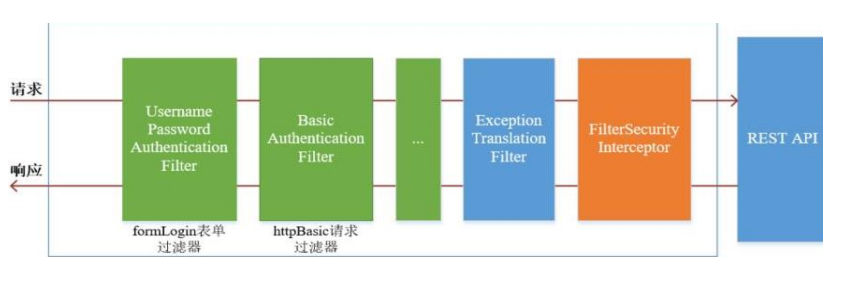
二、 SpringSecurity 基本流程 绿色部分是认证过滤器,需要我们自己配置,可以配置多个认证过滤器。认证过滤器可以使用 Spring Security 提供的认证过滤器,也可以自定义过滤器(例如:短信验证)。认证过滤器要在 configure(HttpSecurity http) 方法中配置,没有配置不生效。下面会重
点介绍以下三个过滤器:
UsernamePasswordAuthenticationFilter 过滤器:该过滤器会拦截前端提交的 POST 方式的登录表单请求,并进行身份认证。ExceptionTranslationFilter 过滤器:该过滤器不需要我们配置,对于前端提交的请求会直接放行,捕获后续抛出的异常并进行处理(例如:权限访问限制)。FilterSecurityInterceptor 过滤器:该过滤器是过滤器链的最后一个过滤器,根据资源权限配置来判断当前请求是否有权限访问对应的资源。如果访问受限会抛出相关异常,并由 ExceptionTranslationFilter 过滤器进行捕获和处理。
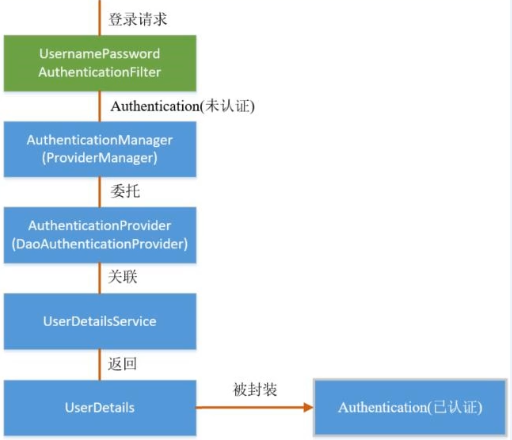
三、 SpringSecurity 认证流程 认证流程是在 UsernamePasswordAuthenticationFilter 过滤器中处理的
UsernamePasswordAuthenticationFilter 源码 当前端提交的是一个 POST 方式的登录表单请求,就会被该过滤器拦截,并进行身份认证。该过滤器的 doFilter() 方法实现在其抽象父类AbstractAuthenticationProcessingFilter 中,查看相关源码:
1 2 3 4 5 6 7 8 9 10 11 12 13 14 15 16 17 18 19 20 21 22 23 24 25 26 27 28 29 30 31 32 33 34 35 36 37 38 39 public void doFilter (ServletRequest req, ServletResponse res, FilterChain chain) throws IOException, ServletException HttpServletRequest request = (HttpServletRequest)req; HttpServletResponse response = (HttpServletResponse)res; if (!this .requiresAuthentication(request, response)) { chain.doFilter(request, response); } else { if (this .logger.isDebugEnabled()) { this .logger.debug("Request is to process authentication" ); } Authentication authResult; try { authResult = this .attemptAuthentication(request, response); if (authResult == null ) { return ; } this .sessionStrategy.onAuthentication(authResult, request, response); } catch (InternalAuthenticationServiceException var8) { this .logger.error("An internal error occurred while trying to authenticate the user." , var8); this .unsuccessfulAuthentication(request, response, var8); return ; } catch (AuthenticationException var9) { this .unsuccessfulAuthentication(request, response, var9); return ; } if (this .continueChainBeforeSuccessfulAuthentication) { chain.doFilter(request, response); } this .successfulAuthentication(request, response, chain, authResult); } }
上述的第二个过程调用子类UsernamePasswordAuthenticationFilter r 的attemptAuthentication() 方法
1
2
3
4
5
6
7
8
9
10
11
12
13
14
15
16
17
18
19
20
21
22
23
24
25
26
27
28
29
30
31
32
33
34
35
36
37
public class UsernamePasswordAuthenticationFilter extends AbstractAuthenticationProcessingFilter public static final String SPRING_SECURITY_FORM_USERNAME_KEY = "username" ; public static final String SPRING_SECURITY_FORM_PASSWORD_KEY = "password" ; private String usernameParameter = "username" ; private String passwordParameter = "password" ; private boolean postOnly = true ; public UsernamePasswordAuthenticationFilter () super (new AntPathRequestMatcher("/login" , "POST" )); } public Authentication attemptAuthentication (HttpServletRequest request, HttpServletResponse response) throws AuthenticationException if (this .postOnly && !request.getMethod().equals("POST" )) { throw new AuthenticationServiceException("Authentication method not supported: " + request.getMethod()); } else { String username = this .obtainUsername(request); String password = this .obtainPassword(request); if (username == null ) { username = "" ; } if (password == null ) { password = "" ; } username = username.trim(); UsernamePasswordAuthenticationToken authRequest = new UsernamePasswordAuthenticationToken(username, password); this .setDetails(request, authRequest); return this .getAuthenticationManager().authenticate(authRequest); } }
上述的(3)过程创建的 UsernamePasswordAuthenticationToken 是Authentication 接口的实现类 ,该类有两个构造器,一个用于封装前端请求传入的未认证的用户信息 ,一个用于封装认证成功后的用户信息 :
1
2
3
4
5
6
7
8
9
10
11
12
13
14
15
16
17
18
19
20
public class UsernamePasswordAuthenticationToken extends AbstractAuthenticationToken private static final long serialVersionUID = 520L ; private final Object principal; private Object credentials; public UsernamePasswordAuthenticationToken (Object principal, Object credentials) super ((Collection)null ); this .principal = principal; this .credentials = credentials; this .setAuthenticated(false ); } public UsernamePasswordAuthenticationToken (Object principal, Object credentials, Collection<? extends GrantedAuthority> authorities) super (authorities); this .principal = principal; this .credentials = credentials; super .setAuthenticated(true ); }
Authentication 接口的实现类用于存储用户认证信息,查看该接口具体定义
1
2
3
4
5
6
7
8
9
10
11
12
13
14
public interface Authentication extends Principal , Serializable Collection<? extends GrantedAuthority> getAuthorities(); Object getCredentials () ; Object getDetails () ; Object getPrincipal () ; boolean isAuthenticated () void setAuthenticated (boolean var1) throws IllegalArgumentException }
ProviderManager 源码 上述过程中,UsernamePasswordAuthenticationFilter 过滤器的attemptAuthentication() 方法的(5)过程将未认证的 Authentication 对象传入ProviderManager 类的 authenticate() 方法进行身份认证。
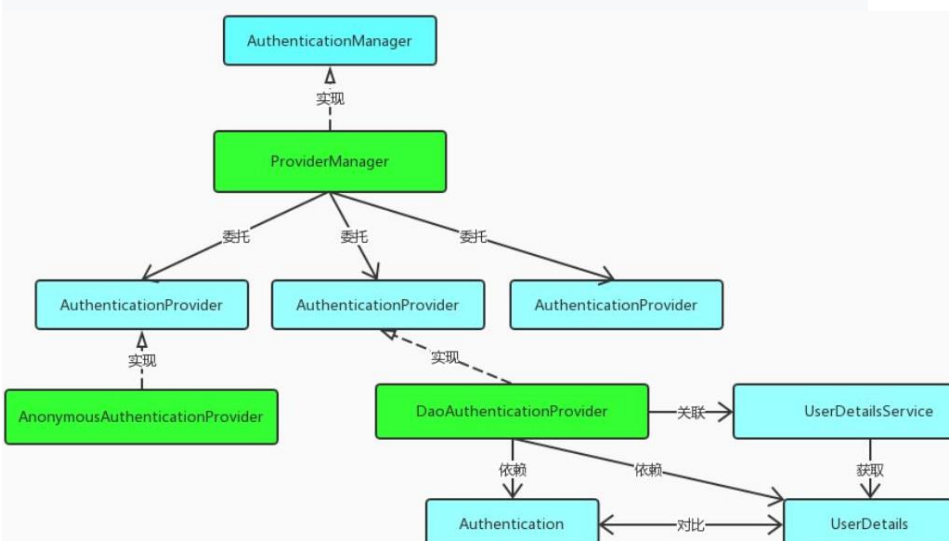
ProviderManager 是 AuthenticationManager 接口的实现类,该接口是认证相关的核心接口,也是认证的入口。在实际开发中,我们可能有多种不同的认证方式 ,例如:用户名+密码、邮箱+密码、手机号+验证码等,而这些认证方式的入口始终只有一个,那就是AuthenticationManager。在该接口的常用实现类 ProviderManager 内部会维护一个List 列表,存放多种认证方式,实际上这是委托者模式(Delegate)的应用 。每种认证方式对应着一个 AuthenticationProvider,AuthenticationManager 根据认证方式的不同(根据传入的 Authentication 类型判断)委托对应的 AuthenticationProvider 进行用户认证。
1
2
3
4
5
6
7
8
9
10
11
12
13
14
15
16
17
18
19
20
21
22
23
24
25
26
27
28
29
30
31
32
33
34
35
36
37
38
39
40
41
42
43
44
45
46
47
48
49
50
51
52
53
54
55
56
57
58
59
60
61
62
63
64
65
66
67
68
69
70
71
72
73
74
75
76
public class ProviderManager implements AuthenticationManager , MessageSourceAware , InitializingBean public Authentication authenticate (Authentication authentication) throws AuthenticationException Class<? extends Authentication> toTest = authentication.getClass(); AuthenticationException lastException = null ; AuthenticationException parentException = null ; Authentication result = null ; Authentication parentResult = null ; boolean debug = logger.isDebugEnabled(); Iterator var8 = this .getProviders().iterator(); while (var8.hasNext()) { AuthenticationProvider provider = (AuthenticationProvider)var8.next(); if (provider.supports(toTest)) { if (debug) { logger.debug("Authentication attempt using " + provider.getClass().getName()); } try { result = provider.authenticate(authentication); if (result != null ) { this .copyDetails(authentication, result); break ; } } catch (InternalAuthenticationServiceException | AccountStatusException var13) { this .prepareException(var13, authentication); throw var13; } catch (AuthenticationException var14) { lastException = var14; } } } if (result == null && this .parent != null ) { try { result = parentResult = this .parent.authenticate(authentication); } catch (ProviderNotFoundException var11) { } catch (AuthenticationException var12) { parentException = var12; lastException = var12; } } if (result != null ) { if (this .eraseCredentialsAfterAuthentication && result instanceof CredentialsContainer) { ((CredentialsContainer)result).eraseCredentials(); } if (parentResult == null ) { this .eventPublisher.publishAuthenticationSuccess(result); } return result; } else { if (lastException == null ) { lastException = new ProviderNotFoundException(this .messages.getMessage("ProviderManager.providerNotFound" , new Object[]{toTest.getName()}, "No AuthenticationProvider found for {0}" )); } if (parentException == null ) { this .prepareException((AuthenticationException)lastException, authentication); } throw lastException; } } }
上述认证成功之后的(6)过程,调用 CredentialsContainer 接口定义的eraseCredentials() 方法去除敏感信息。查看UsernamePasswordAuthenticationToken 实现的 eraseCredentials() 方法,该方法实现在其父类中:
1
2
3
4
5
6
7
8
9
10
11
12
13
14
15
public abstract class AbstractAuthenticationToken implements Authentication , CredentialsContainer public void eraseCredentials () this .eraseSecret(this .getCredentials()); this .eraseSecret(this .getPrincipal()); this .eraseSecret(this .details); } private void eraseSecret (Object secret) if (secret instanceof CredentialsContainer) { ((CredentialsContainer)secret).eraseCredentials(); } }
认证成功/失败处理 UsernamePasswordAuthenticationFilter 过滤器的 doFilter() 方法,查看认证成功/失败的处理
1
2
3
4
5
6
7
8
9
10
11
12
13
14
15
16
17
18
19
20
21
22
23
24
25
26
27
28
29
30
31
32
public abstract class AbstractAuthenticationProcessingFilter extends GenericFilterBean implements ApplicationEventPublisherAware , MessageSourceAware protected void successfulAuthentication (HttpServletRequest request, HttpServletResponse response, FilterChain chain, Authentication authResult) throws IOException, ServletException if (this .logger.isDebugEnabled()) { this .logger.debug("Authentication success. Updating SecurityContextHolder to contain: " + authResult); } SecurityContextHolder.getContext().setAuthentication(authResult); this .rememberMeServices.loginSuccess(request, response, authResult); if (this .eventPublisher != null ) { this .eventPublisher.publishEvent(new InteractiveAuthenticationSuccessEvent(authResult, this .getClass())); } this .successHandler.onAuthenticationSuccess(request, response, authResult); } protected void unsuccessfulAuthentication (HttpServletRequest request, HttpServletResponse response, AuthenticationException failed) throws IOException, ServletException SecurityContextHolder.clearContext(); if (this .logger.isDebugEnabled()) { this .logger.debug("Authentication request failed: " + failed.toString(), failed); this .logger.debug("Updated SecurityContextHolder to contain null Authentication" ); this .logger.debug("Delegating to authentication failure handler " + this .failureHandler); } this .rememberMeServices.loginFail(request, response); this .failureHandler.onAuthenticationFailure(request, response, failed); }
四、SpringSecurity权限流程 绍权限访问流程,主要是对ExceptionTranslationFilter 过滤器和 FilterSecurityInterceptor 过滤器进行介绍。
ExceptionTranslationFilter 是用于处理异常的,不需要我们配置,对于前端提交的请求会直接放行,捕获后续抛出的异常并进行处理(例如:权限访问限制)。具体源码如下:
1 2 3 4 5 6 7 8 9 10 11 12 13 14 15 16 17 18 19 20 21 22 23 24 25 26 27 28 29 30 31 32 33 34 35 36 37 38 39 40 41 42 43 44 45 46 public class ExceptionTranslationFilter extends GenericFilterBean ... public void doFilter (ServletRequest req, ServletResponse res, FilterChain chain) throws IOException, ServletException HttpServletRequest request = (HttpServletRequest)req; HttpServletResponse response = (HttpServletResponse)res; try { chain.doFilter(request, response); this .logger.debug("Chain processed normally" ); } catch (IOException var9) { throw var9; } catch (Exception var10) { Throwable[] causeChain = this .throwableAnalyzer.determineCauseChain(var10); RuntimeException ase = (AuthenticationException)this .throwableAnalyzer.getFirstThrowableOfType(AuthenticationException.class, causeChain); if (ase == null ) { ase = (AccessDeniedException)this .throwableAnalyzer.getFirstThrowableOfType(AccessDeniedException.class, causeChain); } if (ase == null ) { if (var10 instanceof ServletException) { throw (ServletException)var10; } if (var10 instanceof RuntimeException) { throw (RuntimeException)var10; } throw new RuntimeException(var10); } if (response.isCommitted()) { throw new ServletException("Unable to handle the Spring Security Exception because the response is already committed." , var10); } this .handleSpringSecurityException(request, response, chain, (RuntimeException)ase); } } }
FilterSecurityInterceptor FilterSecurityInterceptor 是过滤器链的最后一个过滤器,该过滤器是过滤器链的最后一个过滤器,根据资源权限配置来判断当前请求是否有权限访问对应的资源。如果访问受限会抛出相关异常,最终所抛出的异常会由前一个过滤器ExceptionTranslationFilter 进行捕获和处理。
1
2
3
4
5
6
7
8
9
10
11
12
13
14
15
16
17
18
19
20
21
22
23
24
25
26
27
28
29
30
31
32
33
34
35
36
37
public class FilterSecurityInterceptor extends AbstractSecurityInterceptor implements Filter public void doFilter (ServletRequest request, ServletResponse response, FilterChain chain) throws IOException, ServletException FilterInvocation fi = new FilterInvocation(request, response, chain); invoke(fi); } public void invoke (FilterInvocation fi) throws IOException, ServletException if ((fi.getRequest() != null ) && (fi.getRequest().getAttribute(FILTER_APPLIED) != null ) && observeOncePerRequest) { fi.getChain().doFilter(fi.getRequest(), fi.getResponse()); } else { if (fi.getRequest() != null && observeOncePerRequest) { fi.getRequest().setAttribute(FILTER_APPLIED, Boolean.TRUE); } InterceptorStatusToken token = super .beforeInvocation(fi); try { fi.getChain().doFilter(fi.getRequest(), fi.getResponse()); } finally { super .finallyInvocation(token); } super .afterInvocation(token, null ); } } }
需要注意,Spring Security 的过滤器链是配置在 SpringMVC 的核心组件DispatcherServlet 运行之前。也就是说,请求通过 Spring Security 的所有过滤器,不意味着能够正常访问资源,该请求还需要通过 SpringMVC 的拦截器链。
五、SpringSecurity 请求间共享认证信息 一般认证成功后的用户信息是通过 Session 在多个请求之间共享,那么 Spring Security 中是如何实现将已认证的用户信息对象 Authentication 与 Session 绑定的进行具体分析
认证成功的处理方法 successfulAuthentication()
1
2
3
4
5
6
7
8
9
10
11
12
13
14
15
16
17
18
19
20
21
protected void successfulAuthentication (HttpServletRequest request, HttpServletResponse response, FilterChain chain, Authentication authResult) throws IOException, ServletException { if (logger.isDebugEnabled()) { logger.debug("Authentication success. Updating SecurityContextHolder to contain: " + authResult); } SecurityContextHolder.getContext().setAuthentication(authResult); rememberMeServices.loginSuccess(request, response, authResult); if (this .eventPublisher != null ) { eventPublisher.publishEvent(new InteractiveAuthenticationSuccessEvent( authResult, this .getClass())); } successHandler.onAuthenticationSuccess(request, response, authResult); }
查 看 SecurityContext 接 口 及 其 实 现 类 SecurityContextImpl , 该 类 其 实 就 是 对Authentication 的封装:
1
2
3
4
5
6
7
8
9
10
11
12
13
14
15
16
17
18
19
20
21
22
23
24
25
26
27
28
29
30
31
32
33
34
35
36
37
38
39
40
41
42
43
44
45
46
47
48
49
50
51
52
53
54
55
56
public interface SecurityContext extends Serializable Authentication getAuthentication () ; void setAuthentication (Authentication var1) } public class SecurityContextImpl implements SecurityContext private static final long serialVersionUID = 520L ; private Authentication authentication; public SecurityContextImpl () } public SecurityContextImpl (Authentication authentication) this .authentication = authentication; } public boolean equals (Object obj) if (obj instanceof SecurityContextImpl) { SecurityContextImpl test = (SecurityContextImpl)obj; if (this .getAuthentication() == null && test.getAuthentication() == null ) { return true ; } if (this .getAuthentication() != null && test.getAuthentication() != null && this .getAuthentication().equals(test.getAuthentication())) { return true ; } } return false ; } public Authentication getAuthentication () return this .authentication; } public int hashCode () return this .authentication == null ? -1 : this .authentication.hashCode(); } public void setAuthentication (Authentication authentication) this .authentication = authentication; } public String toString () StringBuilder sb = new StringBuilder(); sb.append(super .toString()); if (this .authentication == null ) { sb.append(": Null authentication" ); } else { sb.append(": Authentication: " ).append(this .authentication); } return sb.toString(); } }
查 看 SecurityContextHolder 类 , 该 类 其 实 是 对 ThreadLocal 的 封 装 , 存 储SecurityContext 对象:
1
2
3
4
5
6
7
8
9
10
11
12
13
14
15
16
17
18
19
20
21
22
23
24
25
26
27
28
29
30
31
32
33
34
35
36
37
38
39
40
public class SecurityContextHolder private static SecurityContextHolderStrategy strategy; private static int initializeCount = 0 ; public SecurityContextHolder () } private static void initialize () if (!StringUtils.hasText(strategyName)) { strategyName = "MODE_THREADLOCAL" ; } if (strategyName.equals("MODE_THREADLOCAL" )) { strategy = new ThreadLocalSecurityContextHolderStrategy(); } else if (strategyName.equals("MODE_INHERITABLETHREADLOCAL" )) { strategy = new InheritableThreadLocalSecurityContextHolderStrategy(); } else if (strategyName.equals("MODE_GLOBAL" )) { strategy = new GlobalSecurityContextHolderStrategy(); } else { try { Class<?> clazz = Class.forName(strategyName); Constructor<?> customStrategy = clazz.getConstructor(); strategy = (SecurityContextHolderStrategy)customStrategy.newInstance(); } catch (Exception var2) { ReflectionUtils.handleReflectionException(var2); } } ++initializeCount; } public static SecurityContext getContext () return strategy.getContext(); } public static void setContext (SecurityContext context) strategy.setContext(context); } }
1
2
3
4
5
6
7
8
9
10
11
12
13
14
15
16
17
18
19
20
21
22
23
24
25
26
27
28
29
30
31
final class ThreadLocalSecurityContextHolderStrategy implements SecurityContextHolderStrategy private static final ThreadLocal<SecurityContext> contextHolder = new ThreadLocal(); ThreadLocalSecurityContextHolderStrategy() { } public void clearContext () contextHolder.remove(); } public SecurityContext getContext () SecurityContext ctx = (SecurityContext)contextHolder.get(); if (ctx == null ) { ctx = this .createEmptyContext(); contextHolder.set(ctx); } return ctx; } public void setContext (SecurityContext context) Assert.notNull(context, "Only non-null SecurityContext instances are permitted" ); contextHolder.set(context); } public SecurityContext createEmptyContext () return new SecurityContextImpl(); } }
SecurityContextPersistenceFilter 过滤器
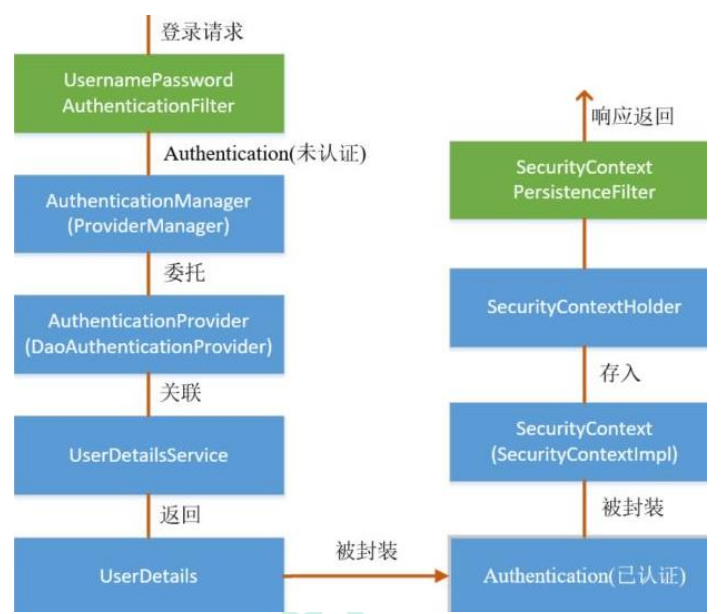
在 UsernamePasswordAuthenticationFilter 过滤器认证成功之后,会在认证成功的处理方法中将已认证的用户信息对象 Authentication 封装进SecurityContext,并存入 SecurityContextHolder
之后,响应会通过 SecurityContextPersistenceFilter 过滤器,该过滤器的位置在所有过滤器的最前面,请求到来先进它,响应返回最后一个通过它,所以在该过滤器中处理已认证的用户信息对象 Authentication 与 Session 绑定。
认证成功的响应通过 SecurityContextPersistenceFilter 过滤器时,会从SecurityContextHolder 中取出封装了已认证用户信息对象 Authentication 的SecurityContext,放进 Session 中。当请求再次到来时 ,请求首先经过该过滤器,该过滤器会判断当前请求的 Session 是否存有 SecurityContext 对象,如果有则将该对象取出再次放入 SecurityContextHolder 中,之后该请求所在的线程获得认证用户信息,后续的资源访问不需要进行身份认证 ;当响应再次返回时,该过滤器同样从 SecurityContextHolder 取出SecurityContext 对象,放入 Session 中。
1
2
3
4
5
6
7
8
9
10
11
12
13
14
15
16
17
18
19
20
21
22
23
24
25
26
27
28
29
30
31
32
33
34
35
36
37
38
39
40
41
42
43
44
45
46
47
48
49
50
51
52
53
54
55
56
57
58
59
60
61
public class SecurityContextPersistenceFilter extends GenericFilterBean ... public void doFilter (ServletRequest req, ServletResponse res, FilterChain chain) throws IOException, ServletException { HttpServletRequest request = (HttpServletRequest) req; HttpServletResponse response = (HttpServletResponse) res; if (request.getAttribute(FILTER_APPLIED) != null ) { chain.doFilter(request, response); return ; } final boolean debug = logger.isDebugEnabled(); request.setAttribute(FILTER_APPLIED, Boolean.TRUE); if (forceEagerSessionCreation) { HttpSession session = request.getSession(); if (debug && session.isNew()) { logger.debug("Eagerly created session: " + session.getId()); } } HttpRequestResponseHolder holder = new HttpRequestResponseHolder(request, response); SecurityContext contextBeforeChainExecution = repo.loadContext(holder); try { SecurityContextHolder.setContext(contextBeforeChainExecution); chain.doFilter(holder.getRequest(), holder.getResponse()); } finally { SecurityContext contextAfterChainExecution = SecurityContextHolder .getContext(); SecurityContextHolder.clearContext(); repo.saveContext(contextAfterChainExecution, holder.getRequest(), holder.getResponse()); request.removeAttribute(FILTER_APPLIED); if (debug) { logger.debug("SecurityContextHolder now cleared, as request processing completed" ); } } } public void setForceEagerSessionCreation (boolean forceEagerSessionCreation) this .forceEagerSessionCreation = forceEagerSessionCreation; } }